Controles (Padrão)
| Ação | Teclado |
|---|---|
| D-Pad (Mover) | Setas do teclado |
| Botão A / Principal | Z |
| Botão B / Secundário | X |
| Start | Enter |
| Select | Shift |
* Os controles podem variar dependendo do console. Suporte nativo para Gamepad/Controle via USB/Bluetooth também está ativado.
About this game
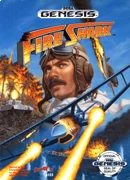
In Fire Shark, available on the Sega Genesis, you take control of a powerful fighter plane tasked with taking down waves of enemy aircraft and ground targets. Set against a backdrop of vibrant pixel art and explosive action, your mission is to navigate through intense levels filled with challenging foes and massive end-of-stage bosses. The gameplay focuses on classic shoot-'em-up mechanics, allowing you to dodge enemy fire while unleashing your own arsenal of weapons. Collect power-ups to enhance your firepower, including rapid-fire shots and devastating bombs that can clear the screen of enemies. As you progress, the difficulty ramps up, demanding quick reflexes and strategic thinking to survive increasingly complex enemy formations. With its engaging gameplay and nostalgic charm, Fire Shark invites players to relive the excitement of retro arcade action right from their browsers. Get ready to soar through the skies and experience the thrill of aerial combat—play now!
Frequently Asked Questions
❓ What is Fire Shark on Sega Genesis?
Fire Shark is a classic scrolling shooter game released for the Sega Genesis in the early 1990s. Players control a fighter plane and must navigate through various levels while battling enemy aircraft and bosses.
❓ How to play Fire Shark online?
To play Fire Shark online, you can find various emulators and websites that host the game. Simply search for 'play Fire Shark online' and choose a reputable site to start your gaming experience.
❓ Is there a way to play Fire Shark for free?
Yes, you can play Fire Shark for free by accessing online emulators that support the game. Look for websites that offer free Fire Shark gameplay without requiring downloads.
❓ Can I play Fire Shark on my PC?
Absolutely! You can play Fire Shark on your PC by using an emulator that supports Sega Genesis games. This allows you to enjoy the game just like you would on the original console.
❓ What are the controls for Fire Shark?
The controls for Fire Shark typically include movement keys for navigating your plane and buttons for shooting and using special weapons. You can customize these controls in most emulators to suit your preferences.
❓ Are there any tips for playing Fire Shark?
Yes! To succeed in Fire Shark, focus on dodging enemy fire and collecting power-ups. Learning the patterns of enemy attacks can also help you progress through the game more effectively.
❓ Can I play Fire Shark on mobile devices?
Yes, there are mobile emulators available that allow you to play Fire Shark on your smartphone or tablet. Search for a reliable emulator app and the game ROM to start playing.